Your first run
This tutorial runs every main command on a tiny, randomly initialised model that you build yourself. Nothing is downloaded and no GPU is needed. The whole thing takes about a minute on a laptop.
You will:
- build a 2-layer Llama-style model (320,896 parameters),
- inspect it and preview a quantization plan,
- quantize it to ternary,
- pack the weights to 2 bits, restore them, and check the result,
- measure quality and compare the ternary model with the original,
- look at the result in the TUI.
Why a random model?
A real model takes minutes to hours and gigabytes of disk. The tiny model makes every step instant so you can see what each command does and what it writes. Its outputs are gibberish, and that turns out to be useful in step 6, where OpenTernary refuses to call it a quality result.
Every output below is real, copied from a run of OpenTernary 0.1.0a2 on Linux with a CPU-only PyTorch 2.15.0.
With the same versions, your inspection and content fingerprints (sha256:a1fd…, sha256:2a25…) will match.
Manifest fingerprints include paths and times, so they will differ, and so will timings.
Before you start
You need OpenTernary and PyTorch installed (Installation). If you have no GPU,
openternary setup --backend cpu is enough.
Make an empty folder and work inside it:
1. Build the tiny model
Save this script as make_tiny_model.py:
"""Create a tiny, randomly initialised Llama model for trying OpenTernary offline.

The weights are random: the model produces gibberish. It exists only so that every
command in the tutorial can run on a laptop CPU in seconds, without downloads.
"""

import json
import sys
from pathlib import Path

import torch
from tokenizers import Tokenizer, models, pre_tokenizers
from transformers import LlamaConfig, LlamaForCausalLM, PreTrainedTokenizerFast

out = Path(sys.argv[1] if len(sys.argv) > 1 else "tiny-llama")
out.mkdir(parents=True, exist_ok=False)
torch.manual_seed(0)

# A character-level tokenizer: every printable ASCII character is one token.
specials = ["<unk>", "<s>", "</s>", "<pad>"]
vocab = {token: i for i, token in enumerate(specials + [chr(c) for c in range(32, 127)])}
backend = Tokenizer(models.WordLevel(vocab=vocab, unk_token="<unk>"))
backend.pre_tokenizer = pre_tokenizers.Split("", behavior="isolated")
tokenizer = PreTrainedTokenizerFast(
    tokenizer_object=backend, unk_token="<unk>", bos_token="<s>", eos_token="</s>", pad_token="<pad>"
)
tokenizer.chat_template = "{% for m in messages %}{{ m['content'] }}{% endfor %}"
tokenizer.save_pretrained(out)

config = LlamaConfig(
    vocab_size=len(vocab),
    hidden_size=128,
    intermediate_size=256,
    num_hidden_layers=2,
    num_attention_heads=4,
    num_key_value_heads=2,
    max_position_embeddings=512,
    bos_token_id=1,
    eos_token_id=2,
    pad_token_id=3,
    tie_word_embeddings=False,
)
LlamaForCausalLM(config).save_pretrained(out)
# Marks the model as synthetic: OpenTernary will never report quality acceptance for it.
(out / "openternary-fixture.json").write_text(json.dumps({"pretrained": False, "family": "llama", "seed": 0}))
print(f"wrote {out}")
It needs torch and transformers. Those live in the environment that openternary setup installed into,
so run the script with that environment's Python:
The tiny-llama folder now looks like a model downloaded from Hugging Face: config.json,
model.safetensors, tokenizer files, and one extra file, openternary-fixture.json, which marks the model as
synthetic.
2. Inspect and plan
inspect reads only the headers of the safetensors files by default. It lists every tensor, decides which
ones are quantizable, and loads no weights:
                Inspection — tiny-llama
┏━━━━━━━━━━━━━━━━━━━━━━━┳━━━━━━━━━━━━━━━━━━━━━━━━━━━━━┓
┃ Section               ┃ Value                       ┃
┡━━━━━━━━━━━━━━━━━━━━━━━╇━━━━━━━━━━━━━━━━━━━━━━━━━━━━━┩
│ Revision              │ unknown                     │
│ Adapter               │ transformers                │
│ Architecture          │ ['LlamaForCausalLM']        │
│ Text layers           │ ?                           │
│ Hidden / Intermediate │ ? / ?                       │
│ Vocab                 │ ?                           │
│ Total tensors         │ 21                          │
│ Quantizable           │ 14 (0.919027)               │
│ Total params          │ 320,896                     │
│ Quantizable params    │ 294,912                     │
│ BF16 GB               │ 0.0012                      │
│ FP32 GB               │ 0.0012                      │
│ Fingerprint           │ sha256:a1fd8a0cf17a9fd22... │
└───────────────────────┴─────────────────────────────┘
Inspection completed: /home/user/openternary-demo/runs/2026-11-03_tiny-llama-naive-g128
inspection.json saved to /home/user/openternary-demo/runs/2026-11-03_tiny-llama-naive-g128/inspection.json
Of 21 tensors, 14 are quantizable: the 7 linear layers in each of the 2 decoder layers (q_proj, k_proj,
v_proj, o_proj, gate_proj, up_proj, down_proj). They hold 91.9% of the parameters. The embeddings,
the output head and the norms stay in full precision. The ? rows are fields the generic Transformers adapter
does not read; the Gemma 4 adapter fills them in.
plan goes one step further and shows what quantize would do, still without loading anything:
╭─ Plan (no downloads, loads or writes) ──────────╮
│ Item               Value                        │
│ ─────────────────────────────────────────────── │
│ Model              tiny-llama                   │
│ Backend / scheme   ternary / absmean → ternary  │
│ Scale / group      per_tensor / g128            │
│ Adapter            transformers                 │
│ Targets            14 / 21                      │
│ Device / dtype     cpu / source dtype preserved │
│ Passes             —                            │
│ Not determined offline                          │
│   ? hardware/runtime execution                  │
│   ? artifact reload                             │
│   ? model quality                               │
╰─────────────────────────────────────────────────╯
The last three lines matter: a plan can never tell you whether the result will run, reload or be any good. Only measurement can.
3. Quantize to ternary
The default is one scale per tensor. Per-group scales follow the weights more closely, so use groups of 64
values each. Preview first with --dry-run, which creates nothing:
openternary quantize tiny-llama --scale-granularity per_group --group-size 64 --device cpu --dry-run
Planned: scale_granularity=per_group group_size=64
grouping_scheme=last-dim-rowwise-v1 method=naive
No run directory was created (--dry-run).
Now for real:
openternary quantize tiny-llama --scale-granularity per_group --group-size 64 --device cpu --output runs/tiny-ternary
                 Quantize — tiny-llama
┏━━━━━━━━━━━━━━━━━━━━━━━┳━━━━━━━━━━━━━━━━━━━━━━━━━━━━━┓
┃ Section               ┃ Value                       ┃
┡━━━━━━━━━━━━━━━━━━━━━━━╇━━━━━━━━━━━━━━━━━━━━━━━━━━━━━┩
│ Scale granularity     │ per_group                   │
│ Group size / scheme   │ 64 / last-dim-rowwise-v1    │
│ Quantizable tensors   │ 14                          │
│ Total groups          │ 4608                        │
│ Shards                │ 1                           │
│ Tensor payload        │ 1283584                     │
│ Shard file bytes      │ 1285736                     │
│ Packed estimate bytes │ 196096                      │
│ Content FP            │ sha256:2a25a7bffeeb0d010... │
└───────────────────────┴─────────────────────────────┘
Quantize completed: /home/user/openternary-demo/runs/tiny-ternary
ternary artifact: /home/user/openternary-demo/runs/tiny-ternary/artifacts/snapshot
Every quantizable weight is now one of three values per group, \(\{-s, 0, +s\}\), where \(s\) is that group's
scale. They are still stored as ordinary floating-point numbers, which is why the snapshot is as large as
the original (1,285,736 bytes). This fake-quant form loads in any Transformers code, so you can evaluate it
directly. Packed estimate bytes is what the same weights take at 2 bits each, plus scales and the
unquantized tensors. Ternary quantization explains the arithmetic.
runs/tiny-ternary is a run directory:
runs/tiny-ternary/
├── config.yaml          # the fully resolved configuration that ran
├── environment.json     # versions, git commit, hardware, seed
├── model.json           # model id and revision
├── metrics.json         # status and headline numbers
├── quantization.json    # per-tensor details and fingerprints
├── logs/
└── artifacts/snapshot/  # the quantized model (loadable like any HF model)
    ├── model-00001-of-00001.safetensors
    ├── openternary-manifest.json   # format, provenance, SHA-256 of every file
    └── config.json, tokenizer files, …
Run directory reference describes every file.
4. Pack, restore and validate
Pack the ternary weights to 2 bits each:
Item                  Value
──────────────────────────────────────────────────────────────────────────────
artifact              /home/user/openternary-demo/runs/tiny-packed
manifest              schema_version=1, format=ternary-packed,
                      execution=completed, artifact_validation=file_integrity,
                      model_reload=not_run, quality_acceptance=not_run,
                      manifest_fingerprint=8d5fa902964554cdc928838bd5746183df77…
artifact_validation   file_integrity
The tensor data drops from 1,285,736 bytes to 198,600 bytes, about 6.5× smaller. Most of what remains is the full-precision embeddings and output head. Nothing can run a packed artifact directly yet, so turn it back into safetensors:
Then check it thoroughly. --level tensors opens every tensor and checks its shape, dtype and finiteness
against the manifest:
Item                   Value
──────────────────────────────────────────────────────────────────────────────
artifact               /home/user/openternary-demo/runs/tiny-restored
artifact_validation    tensor_integrity
manifest_fingerprint   b1ef736b683eaa67daae87be5d85e6f7ad433cdd78b6db3c5a7c125f…
tensor_count           21
model_reload           ○ not run
quality_acceptance     ○ not run
The restored tensors are byte-for-byte identical to the fake-quant snapshot. Packing is lossless for ternary
weights. Note what the result does not claim: model_reload and quality_acceptance are ○ not run.
File integrity only shows that the files are intact, not that the model works.
5. Benchmark and compare behaviour
The smoke benchmark runs 5 fixed prompts with greedy decoding and records every generated token:
openternary benchmark tiny-llama --device cpu --dtype fp32 --output runs/bench-original
openternary benchmark runs/tiny-ternary/artifacts/snapshot --device cpu --dtype fp32 --output runs/bench-ternary
openternary compare runs/bench-original runs/bench-ternary --output runs/compare-bench
     Compare — behavioral delta (observational)
┏━━━━━━━━━━━━━━━━━━━━━┳━━━━━━━━━━━━━━━━━━━━━━━━━━━━━┓
┃ Metric              ┃ Value                       ┃
┡━━━━━━━━━━━━━━━━━━━━━╇━━━━━━━━━━━━━━━━━━━━━━━━━━━━━┩
│ Protocol match      │ True                        │
│ Result observation  │ different                   │
│ Result same?        │ False                       │
│ Content match       │ None                        │
│ Baseline result FP  │ sha256:6c4af247d0a4f7029... │
│ Quantized result FP │ sha256:c5b2dce616da98b50... │
└─────────────────────┴─────────────────────────────┘
      Per-prompt token diff
┏━━━━━━━━━━━━━━━━━━━━━━━━┳━━━━━━━┓
┃ Prompt                 ┃ Same? ┃
┡━━━━━━━━━━━━━━━━━━━━━━━━╇━━━━━━━┩
│ smoke.code.python      │ False │
│ smoke.en.short         │ False │
│ smoke.ja.short         │ False │
│ smoke.ja.summary       │ False │
│ smoke.reasoning.simple │ False │
└────────────────────────┴───────┘
Result fingerprint equality is observational, NOT pass/fail.
Protocol match: True means both runs used exactly the same prompts and generation settings, so the comparison
is fair. The outputs differ for every prompt. That is an observation, not a verdict: different text is not
necessarily worse text. To judge quality you need the next step.
6. Measure quality and compare
quality measures perplexity in English and Japanese and runs instruction cases from a frozen dataset file.
Save this deliberately tiny example as quality-mini.json. A real dataset has many more records, and
Evaluate and compare explains the format:
quality-mini.json
{
  "schema_version": 1,
  "dataset": {
    "id": "example/quality-mini",
    "revision": "v1",
    "license": "CC0-1.0",
    "source": [{"id": "handwritten", "revision": "v1"}]
  },
  "splits": {
    "calibration": [
      {"id": "cal-1", "text": "The river carried small boats past the old mill every morning.", "language": "en"}
    ],
    "validation": [
      {"id": "val-en-1", "text": "Tea was first grown in the hills, where the air stays cool and wet all year.", "language": "en"},
      {"id": "val-ja-1", "text": "駅の近くには小さな本屋があり、週末になると多くの人が集まります。", "language": "ja"}
    ],
    "test": [
      {"id": "test-en-1", "text": "A lighthouse keeper wrote down the weather twice a day for forty years.", "language": "en"},
      {"id": "test-ja-1", "text": "冬の朝は空気が澄んでいて、遠くの山まではっきりと見えます。", "language": "ja"}
    ]
  },
  "instruction_cases": {
    "validation": [
      {"id": "val-case-1", "prompt": "Reply with only the word: blue", "expected": "blue"}
    ],
    "test": [
      {"id": "test-case-1", "prompt": "Reply with only the number: 7", "expected": "7"}
    ]
  }
}
openternary quality tiny-llama --data quality-mini.json --device cpu --dtype fp32 --output runs/quality-original
openternary quality runs/tiny-ternary/artifacts/snapshot --data quality-mini.json --device cpu --dtype fp32 --output runs/quality-ternary
openternary compare runs/quality-original runs/quality-ternary --require-acceptance --output runs/compare-gate
The headline numbers (from each run's quality.json):
| English perplexity | Japanese perplexity | Instruction score | |
|---|---|---|---|
| Original | 111.90 | 81.60 | 0 |
| Ternary | 105.36 | 78.13 | 0 |
The ternary model has lower perplexity. On real weights that would be remarkable. Here it means nothing: the
original is random noise, and so is a quantized copy of it. Accordingly, compare refuses to accept it:
│ Quality accepted     │ False   │
│ Quality composite    │ None    │
…
╭─ ✖ Acceptance criteria not met ──────────────────────────────────────────────╮
│ required quality acceptance failed or evidence is incomplete                 │
╰───────────────────────────────────────────────────────────────────── exit 6 ─╯
and runs/compare-gate/acceptance.json gives the reason:
{
  "accepted": false,
  "status": "insufficient_evidence",
  "reason": "schema 3 with matched source/interface/runtime and non-synthetic model evidence required"
}
The quality gate only ever accepts models that are not synthetic, measured with the same source model, tokenizer,
device, dtype and software. With --require-acceptance, failing the gate exits with code 6, so a script or CI
job stops there. Runs and evidence explains why OpenTernary is this strict.
7. See it in the TUI
Run openternary with no arguments in the same folder. The Runs tab lists everything you just made, with
the files in each run:
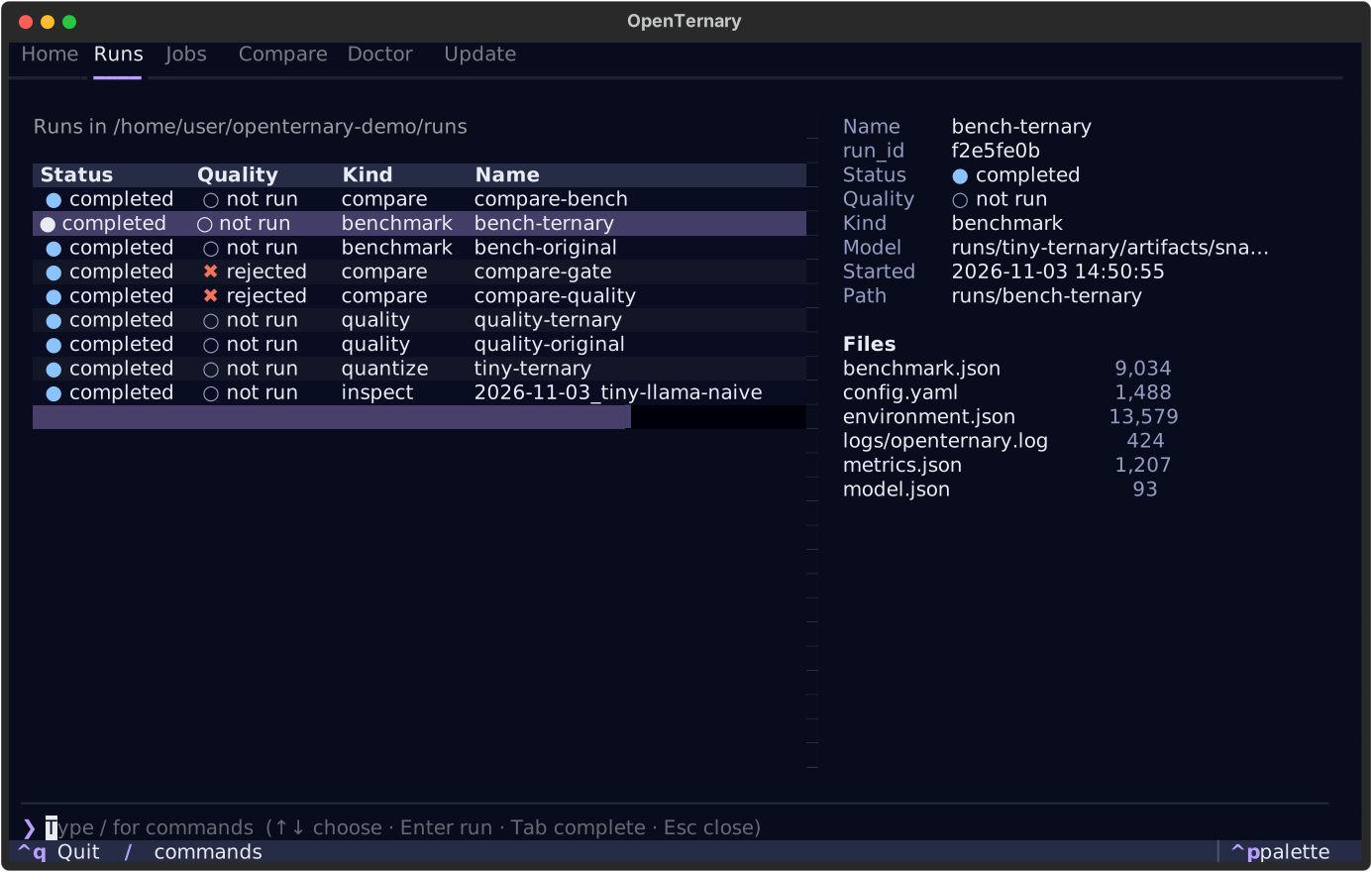
Type /quantize and press Enter to get the same quantization as a form, preview it, and run it as a
background job. The full-screen interface shows how.
Clean up
Everything lives in the folder you made: tiny-llama/ and runs/. Delete the folder when you are done.
What next
- Do the same with a real model: Quantize and Evaluate and compare.
- Understand the numbers: Ternary quantization.
- Try improving the result: Calibrate.